Release managementlink
Overviewlink
Releases are the process by which we build and deliver software to our users. We use a mix of automation and operational practices as part of our continuous delivery (CD) efforts.
Releases have the following goals (among others):
- Produce and publish easily installable packages to common package managers for users.
- Introduce checkpoints with predictable versions around which release notes, testing efforts, and other related activities can align.
- Improve project and ecosystem velocity and stability.
Stable and nightly releaseslink
In addition to stable releases, we build and publish nightly releases too. Nightly releases are less tested and may not include all configurations at all times, but they are convenient to install as a preview for what the next stable release will contain.
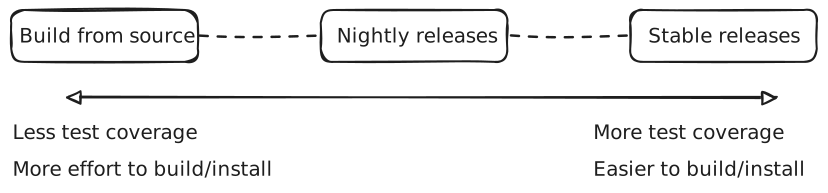
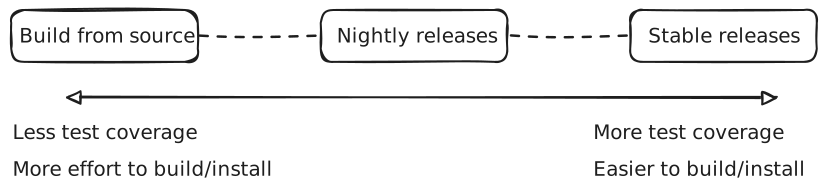
- Stable releases are published to GitHub releases, are pushed to PyPI, and are
installable via
pip installusing default options. - Nightly releases are published to only GitHub releases as "pre-releases" and
are installable via
pip installusing non-default options like--find-linksand our hosted index page at https://iree.dev/pip-release-links.html.
Projects in scopelink
The IREE release process currently considers packages in these projects to be in scope:
Info
If you maintain a project that you would like to connect with this release process, please reach out on one of our communication channels. The current project list is driven by the priorities of the project's maintainers and TSC, and we would be happy to adapt the process to include other projects too.
The dependency graph looks like this:
graph TD
  accTitle: Dependency graph between in-scope packages

  subgraph iree["iree-org/iree"]
    iree-base-compiler
    iree-base-runtime
    iree-tools-tf
    iree-tools-tflite
  end

  subgraph turbine["iree-org/iree-turbine"]
    iree-turbine
  end

  subgraph sharkai["nod-ai/shark-ai"]
    sharktuner
    sharktank
    shortfin
    shark-ai
  end

  iree-base-compiler --> sharktank
  iree-base-compiler --> iree-turbine
  iree-base-runtime --> iree-turbine
  iree-turbine --> sharktank
  iree-base-compiler --> sharktuner
  iree-base-runtime --> sharktuner
  iree-turbine --> sharktuner
  iree-base-runtime -. source dependency .-> shortfin
  sharktuner --> shark-ai
  sharktank --> shark-ai
  shortfin --> shark-ai
Types of dependency linkslink
Most dependencies are loose requirements, not imposing strict limitations on the versions installed. This allows users to freely install similar versions of each package without risking issues during pip dependency resolution. This is important for libraries near the root or middle of a dependency graph.
Requires-Dist: numpy
Requires-Dist: iree-base-compiler
Requires-Dist: iree-base-runtime
Requires-Dist: Jinja2>=3.1.3
Requires-Dist: ml_dtypes>=0.5.0
The shark-ai package is special in that it is a leaf project acting as a full solution for ML model development that does specify precise versions. By installing this package, users will receive packages that have been more rigorously tested together:
Requires-Dist: iree-base-compiler==3.2.*
Requires-Dist: iree-base-runtime==3.2.*
Requires-Dist: iree-turbine==3.2.*
Requires-Dist: sharktank==3.2.0
Requires-Dist: shortfin==3.2.0
This feeds back into the release process - while release candidate selection typically flows from the base projects outwards, leaf projects are responsible for testing regularly and ensuring that the entire collective continues to work as expected.
Release timelinelink
Over the course of a release cycle there are several milestones to look out for:
- Week 0
- Release
X.Y.0is published (see also Versioning scheme) - Versions in source code are updated to
X.{Y+1}.0(see also Creating a patch release) - The next release date target is set for ~6 weeks later
- Subprojects set goals for the release
- Release
- ~1 week before the release date
- Any unstable build/test/release workflows must be stabilized
- Calls for release note contributions are sent out
- Release notes are drafted
- Release candidates are selected
- Release candidates are tested
- Release day
- Release candidates are promoted, release notes are published
- The cycle repeats
Downstream projects are encouraged to test as close to HEAD as possible leading up to each release, so there are multiple high quality candidates to choose from and release candidate testing processes require minimal manual effort.
Note
We do not yet have a process for creating release branches. Instead, we
choose a release candidate from nightly builds of the main branch. We
also do not choose a cutoff point in advance for the release candidate
selection.
This process will likely need to evolve for future releases.
Release statuslink
Stable release history: https://github.com/iree-org/iree/releases?q=prerelease%3Afalse.
iree-org projectslink
| Project | Package | Release status |
|---|---|---|
| iree-org/iree | GitHub release (stable) |  |
| GitHub release (nightly) |  |
|
iree-base-compiler |
 |
|
iree-base-runtime |
 |
|
iree-tools-tf |
 |
|
iree-tools-tflite |
 |
|
| iree-org/iree-turbine | GitHub release (stable) |  |
iree-turbine |
 |
Community projectslink
| Project | Package | Release status |
|---|---|---|
| nod-ai/amd-shark-ai | GitHub release (stable) |  |
shark-ai |
 |
|
sharktuner |
 |
|
sharktank |
 |
|
shortfin |
 |
Deprecated packageslink
| Project | Package | Release status | Notes |
|---|---|---|---|
| iree-org/iree | iree-compiler |
 |
Renamed to iree-base-compiler |
iree-runtime |
 |
Renamed to iree-base-runtime |
|
iree-runtime-instrumented |
 |
Merged into iree[-base]-runtime |
|
iree-tools-xla |
 |
Merged into iree-tools-tf |
|
| nod-ai/AMD-SHARK-ModelDev | shark-turbine |
 |
Renamed to iree-turbine |
Release mechanicslink
IREE cuts automated releases via a workflow that is triggered daily. The only constraint placed on the commit that is released is that it has passed certain CI checks. These are published on GitHub with the "pre-release" status. For debugging this process, see the Release debugging playbook.
We periodically promote one of these candidates to a "stable" release.
Running a releaselink
Developers authoring patches that include major or breaking changes should coordinate merge timing and contribute release notes on the pinned issue that tracks the next release. A pinned issue tracking the release should be filed, based on release-tracker-template.md: copy it, replace the placeholders, and file it with the GitHub CLI:
cp docs/website/docs/developers/general/release-tracker-template.md /tmp/release-tracker.md
# Fill in the version, release date and previous release in /tmp/release-tracker.md.
gh issue create --repo iree-org/iree \
  --title "Release Tracker vX.Y.Z - (YYYY-MM-DD)" \
  --body-file /tmp/release-tracker.md
gh issue pin <issue number> --repo iree-org/iree
Until the release, watch for major or breaking changes and decide whether to batch them with this release or defer them until the next one.
Picking a candidate to promotelink
After approximately one month since the previous release, a new release should be promoted from nightly release candidates.
When selecting a candidate we aim to meet the following criteria:
- Includes packages for all platforms, including macOS and Windows
- ⪆2 days old so that problems with it may have been spotted
- Contains no major regressions vs the previous stable release
When you've identified a potential candidate, comment on the tracking issue with the proposal and solicit feedback. People may point out known regressions or request that some feature make the cut.
Compiling release noteslink
Release notes are collected on the tracking issue, where either contributors add announcements and notable changes as they land, or they are collected on release day.
Generate the "New contributors" list and the full changelog for the range from the previous stable release to the candidate, e.g. with the "Generate release notes" button when drafting a GitHub release, or:
gh api repos/iree-org/iree/releases/generate-notes \
  -f tag_name=v3.12.0 \
  -f target_commitish=iree-3.12.0rc20260917 \
  -f previous_tag_name=v3.11.0 --jq .body
The "Release notes" section of the release tracker template has the expected structure.
The header of the release notes lists the VMFB bytecode version and the HAL module version, and whether they changed since the previous release:
- VMFB bytecode version:
IREE_VM_BYTECODE_VERSION_MAJORandIREE_VM_BYTECODE_VERSION_MINOR. - HAL module version:
IREE_HAL_MODULE_VERSION_LATEST.
Promoting a candidate to stablelink
-
(Authorized users only) Push to PyPI using pypi_deploy.sh. The script is a dry run by default. Check its output, then pass
--publishto upload. Keep the whl folder for upload to GitHub. -
Create a new release on GitHub:
-
Create a new GitHub draft release (via the WebUI or CLI). Set the tag to be created and select a target commit. For example, if the candidate release was tagged
iree-3.1.0rc20241119at commit3ed07da, set the new release tagv3.1.0and use the same commit. GitHub creates the tag when the release is published, so nothing needs to be pushed beforehand.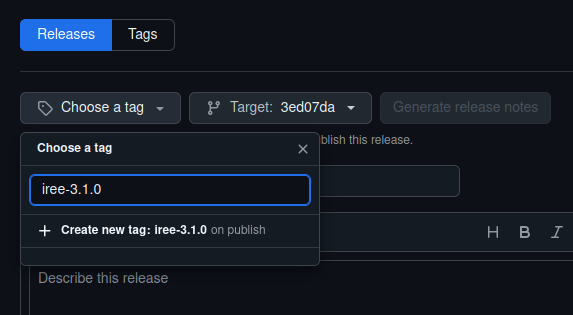
The target picker only lists recent commits. If the candidate's commit does not appear there, create and push the tag yourself, then select it as an existing tag:
git tag -a v3.1.0 iree-3.1.0rc20241119 -m "Version 3.1.0 release."
git rev-parse 'v3.1.0^{commit}'  # Check that this is the candidate's commit.
git push upstream refs/tags/v3.1.0  # Pushes only the tag.
The release can also be created from the command line.
ghcreates the tag on publish, the same way the web UI does. The command also sets the title and release notes from the next two steps. The assets are uploaded to the draft later. You can extract the release notesnotes.mdfrom the release tracking issue.gh issue view <issue number> --repo iree-org/iree --json body --jq .body \ | tr -d '\r' \ | awk 'started { print; next } prev == "---" && $0 == "---" { started = 1 } { prev = $0 }' \ > notes.md gh release create v3.1.0 --repo iree-org/iree \ --target "$(git rev-parse 'iree-3.1.0rc20241119^{commit}')" \ --draft --title "Release v3.1.0" --notes-file notes.md -
Set the title to
Release vX.Y.Z. -
Paste the release notes from the release tracking issue.
-
Upload the
iree-dist-*.tar.xzfiles of the release candidate and.whlfiles ofpypi_deploy.shto the release draft.Download the
iree-dist-*.tar.xzfiles from the candidate release.WHEEL_DIR=/tmp/iree_pypi_wheels.XXXXX gh release download iree-3.1.0rc20241119 --repo iree-org/iree \ --pattern 'iree-dist-*' --dir "${WHEEL_DIR}" gh release upload v3.1.0 --repo iree-org/iree \ "${WHEEL_DIR}"/*.whl "${WHEEL_DIR}"/iree-dist-*.tar.xz -
Publish the release. Uncheck the option for "pre-release", and check the option for "latest" and hit publish.

Or via the CLI:
gh release edit v3.1.0 --repo iree-org/iree --draft=false --latest.
-
-
Release the iree-turbine packages, following iree-turbine's release docs.
-
Increment the versions in source code to the next minor release, so that nightly releases sort after the new stable release (see Versioning scheme): set
package-versiontoX.{Y+1}.0.devin bothcompiler/version.jsonandruntime/version.json, e.g. https://github.com/iree-org/iree/pull/23866. -
Complete any remaining checkbox items on the release tracking issue then close it and open a new one for the next release.
Creating a patch releaselink
-
Create a new branch.
Checkout the corresponding stable release and create a branch for the patch release:
git checkout v3.12.0 git checkout -b v3.12.1 -
Apply and commit the patches.
-
Set the patch level:
-
Adjust
compiler/version.jsonif patches are applied to the compiler. -
Adjust
runtime/version.jsonif patches are applied to the runtime.
-
-
Push all changes to the new branch.
-
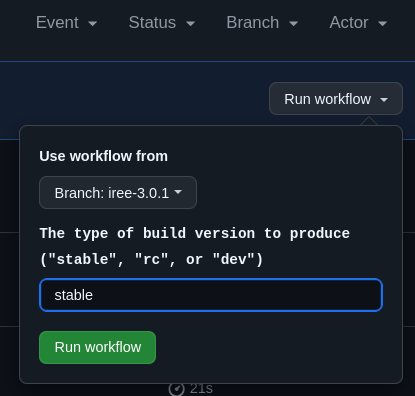
Trigger the Oneshot candidate release workflow to create a release.
-
Select to run the workflow from the patch branch.
-
Set the type of build version to produce to "stable".
-
-
Follow the documentation above to promote to stable. The step to create a new tag can be skipped.